


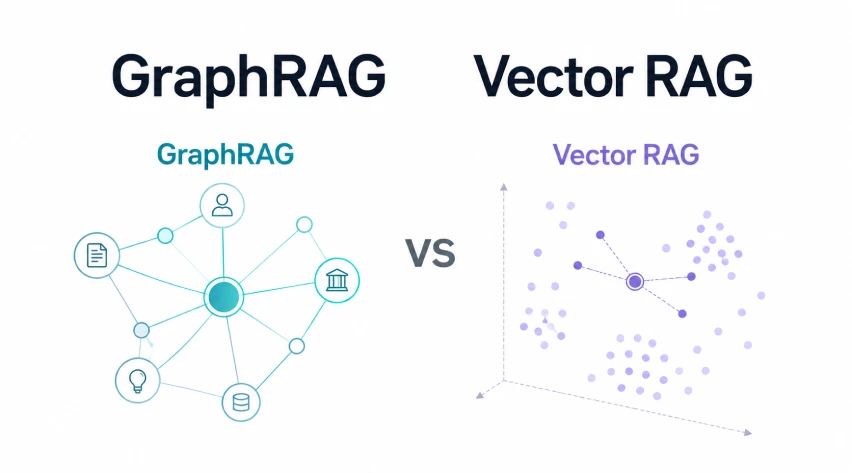
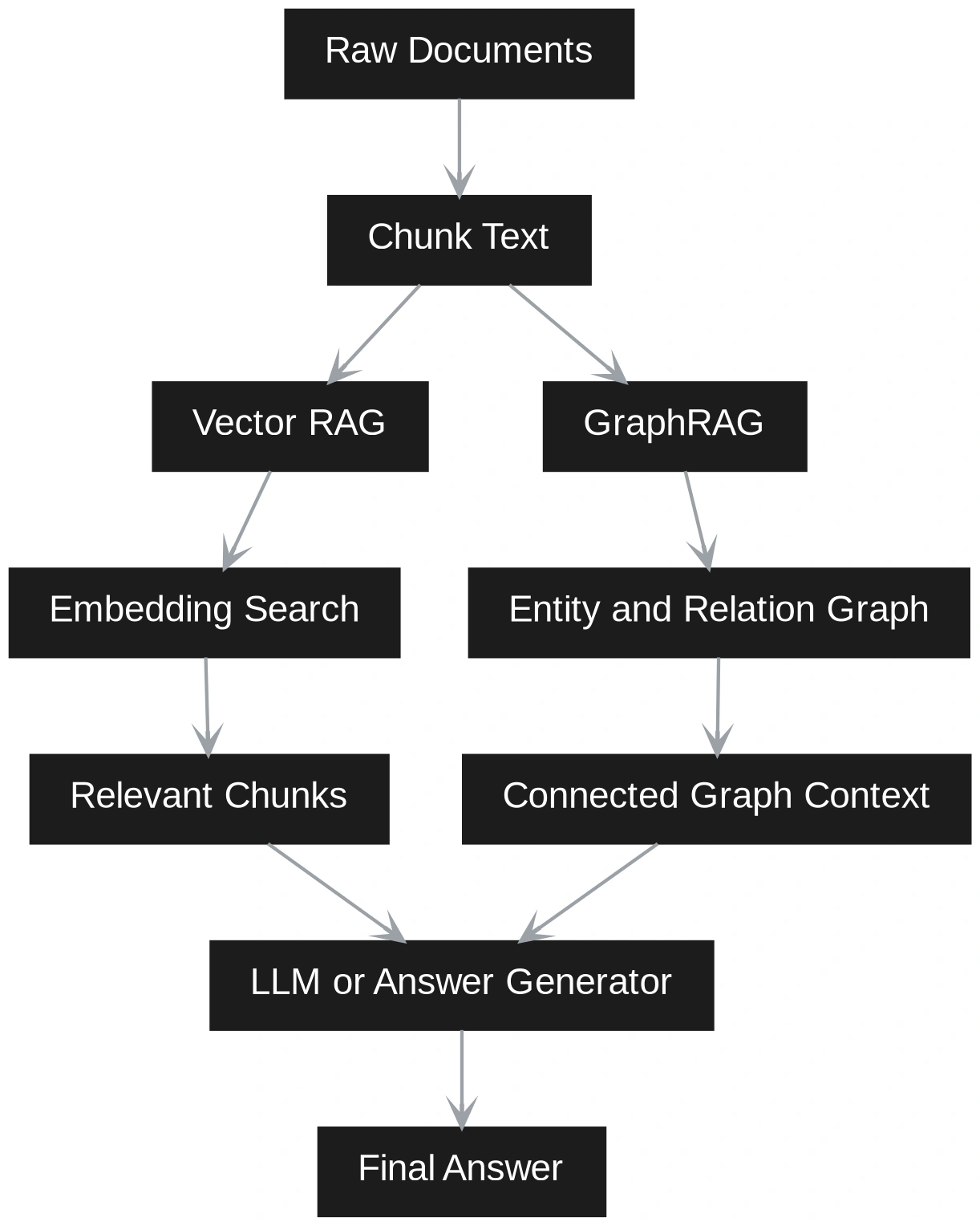
GraphRAG and Vector RAG handle completely different retrieval wants. Vector RAG splits paperwork into chunks, embeds them, retrieves semantically related passages, and sends them to an LLM. It’s easy, quick to construct, and works greatest when solutions sit inside one or two related chunks.
GraphRAG provides construction by extracting entities, relationships, and communities, making it stronger for multi-hop reasoning, explainability, and corpus-wide synthesis throughout related concepts. On this article, a sensible comparability of GraphRAG and Vector RAG, we’ll break down the place every method matches greatest.
Definitions and Structure
Vector RAG works by splitting paperwork into small textual content chunks. Every chunk is transformed into an embedding and saved in a vector database. When a person asks a query, the query can be transformed into an embedding. The system then finds probably the most related chunks and sends them to the LLM to generate a solution.
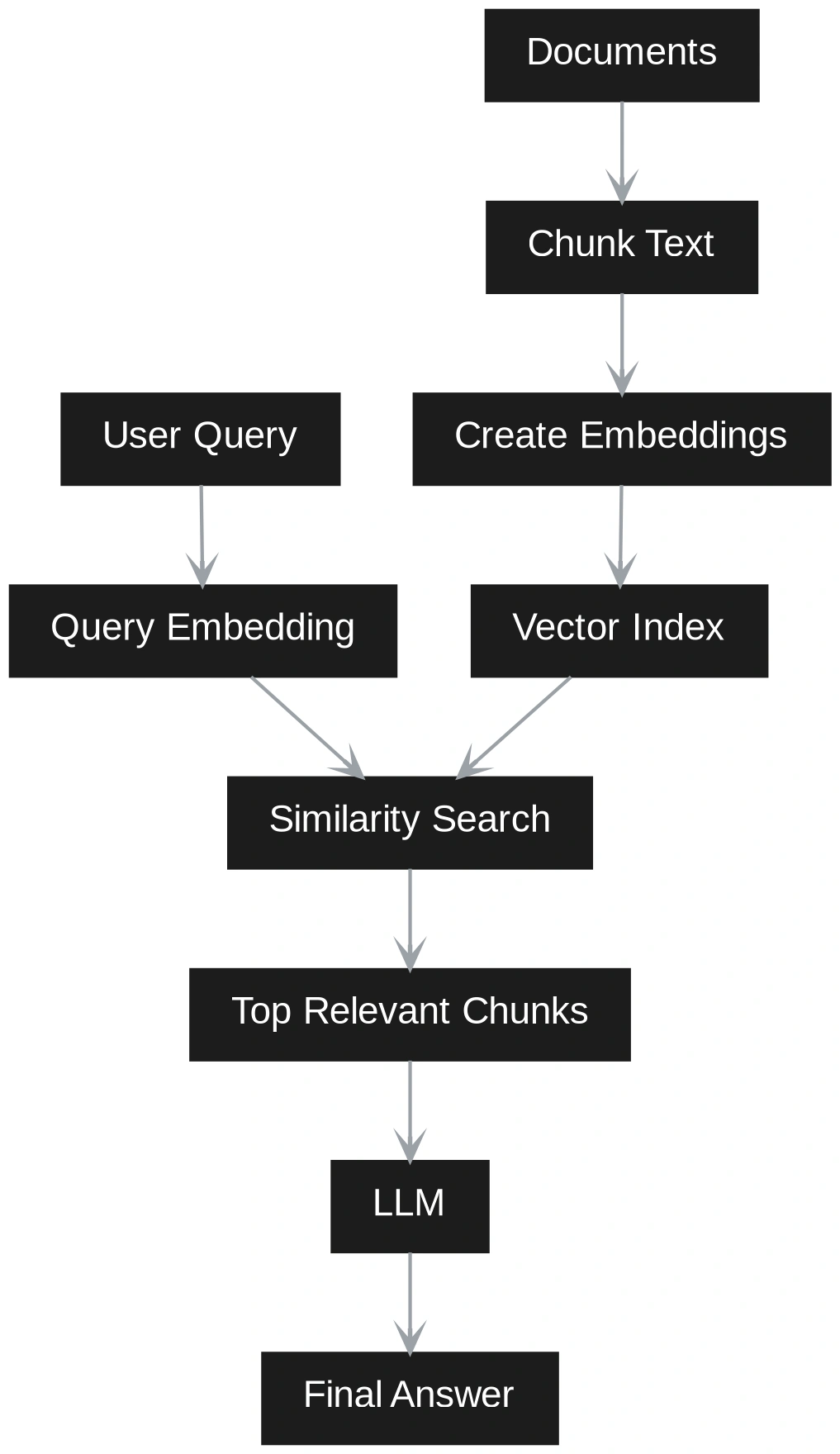
Vector RAG is easy, quick, and straightforward to replace. It really works effectively for direct factual questions. However it shops which means largely by way of embeddings and textual content, not by way of express entities or relationships. Due to this, it could possibly battle with questions that want connections throughout a number of chunks.
GraphRAG provides extra construction. It extracts entities, relationships, claims, and communities from the paperwork. It then builds a graph that exhibits how completely different items of knowledge are related.
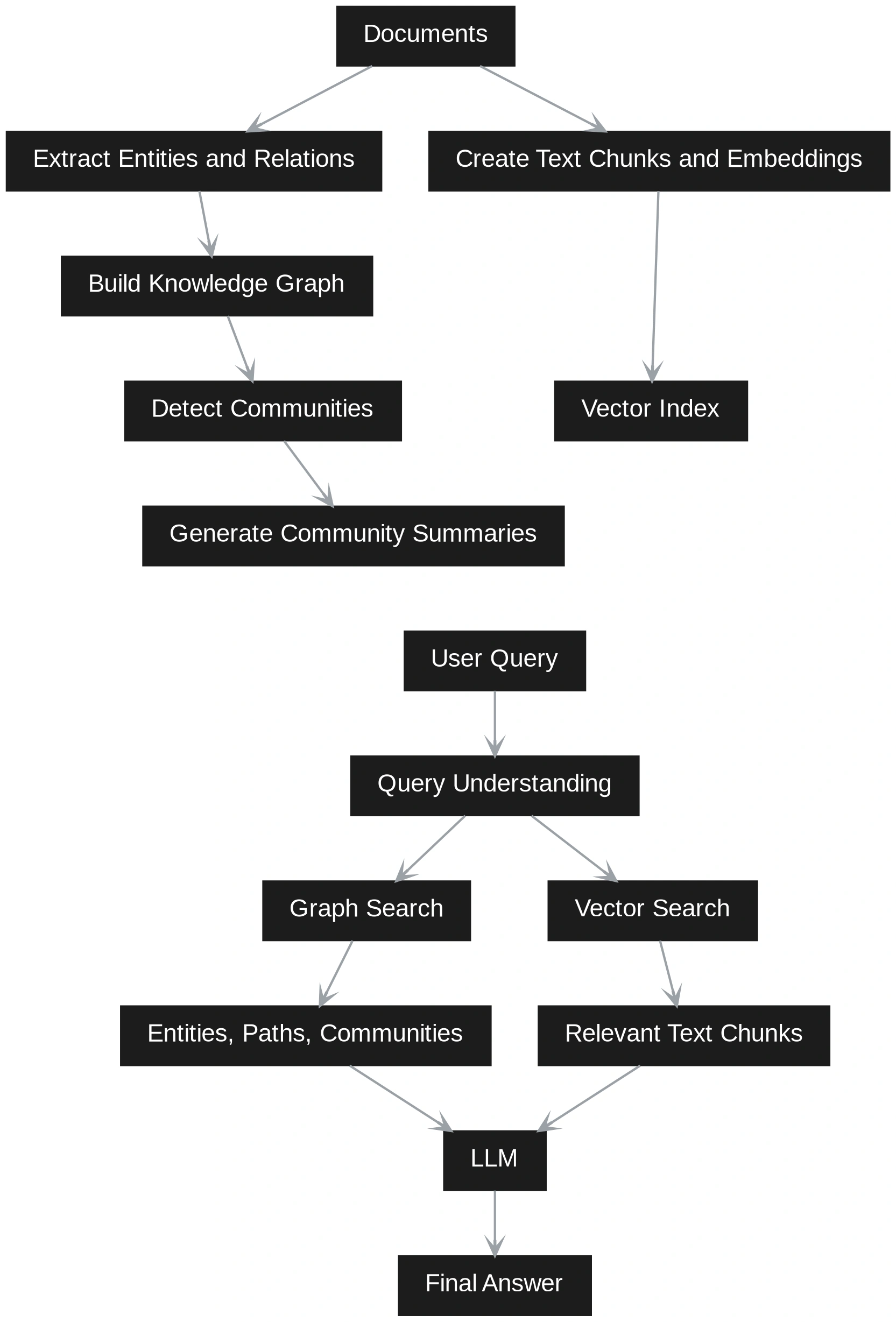
This makes GraphRAG higher for relationship-based questions, multi-step reasoning, and broad understanding throughout a big set of paperwork. The tradeoff is that it takes extra effort and value to construct as a result of it wants graph development, neighborhood detection, and summarization.
In apply, many techniques use each. Vector search rapidly finds related textual content, whereas graph retrieval provides related context and higher reasoning.
How Retrieval Works at Question Time
The most important distinction between Vector RAG and GraphRAG turns into clear at question time. In Vector RAG, the question is handled as a semantic search downside. The person query is transformed into an embedding. The system compares this question embedding with saved chunk embeddings. It retrieves the closest chunks and sends them to the LLM. The LLM then solutions utilizing solely these chunks as context. This works effectively when the reply is instantly out there in a small set of comparable passages.
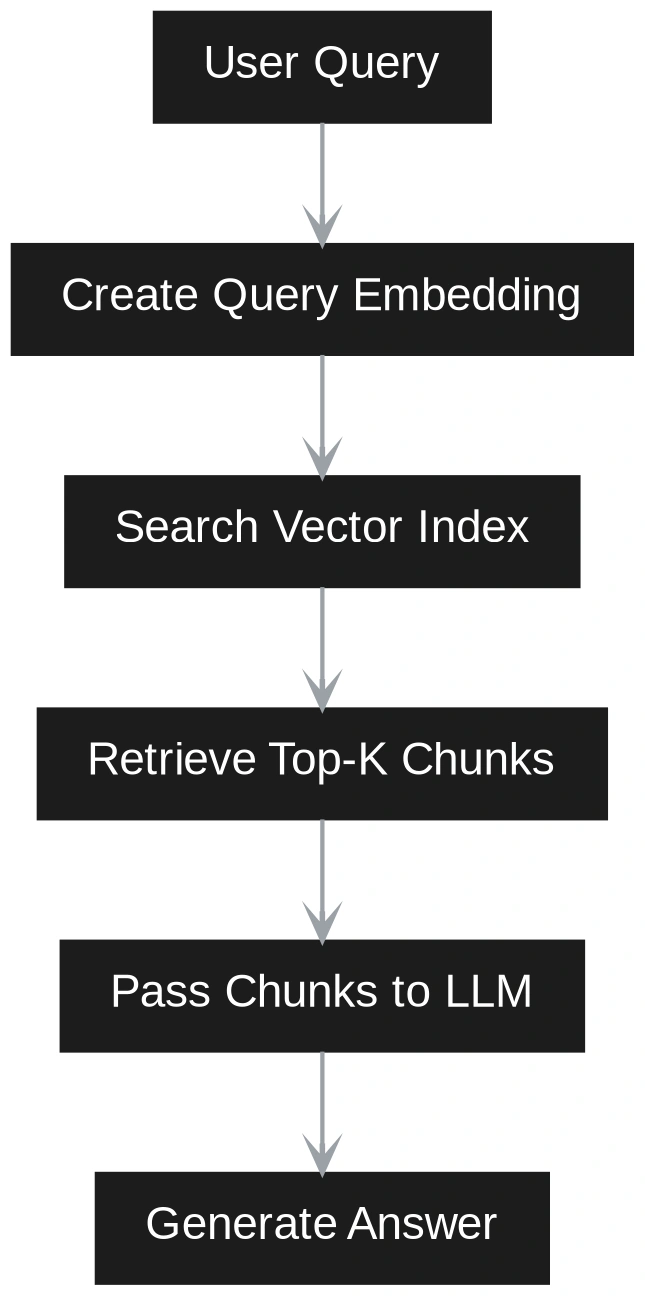
GraphRAG handles the question otherwise. It first tries to grasp whether or not the query is native or international. An area query is a couple of particular entity, occasion, buyer, product, or doc. A worldwide query asks for themes, patterns, dangers, summaries, or relationships throughout the corpus.
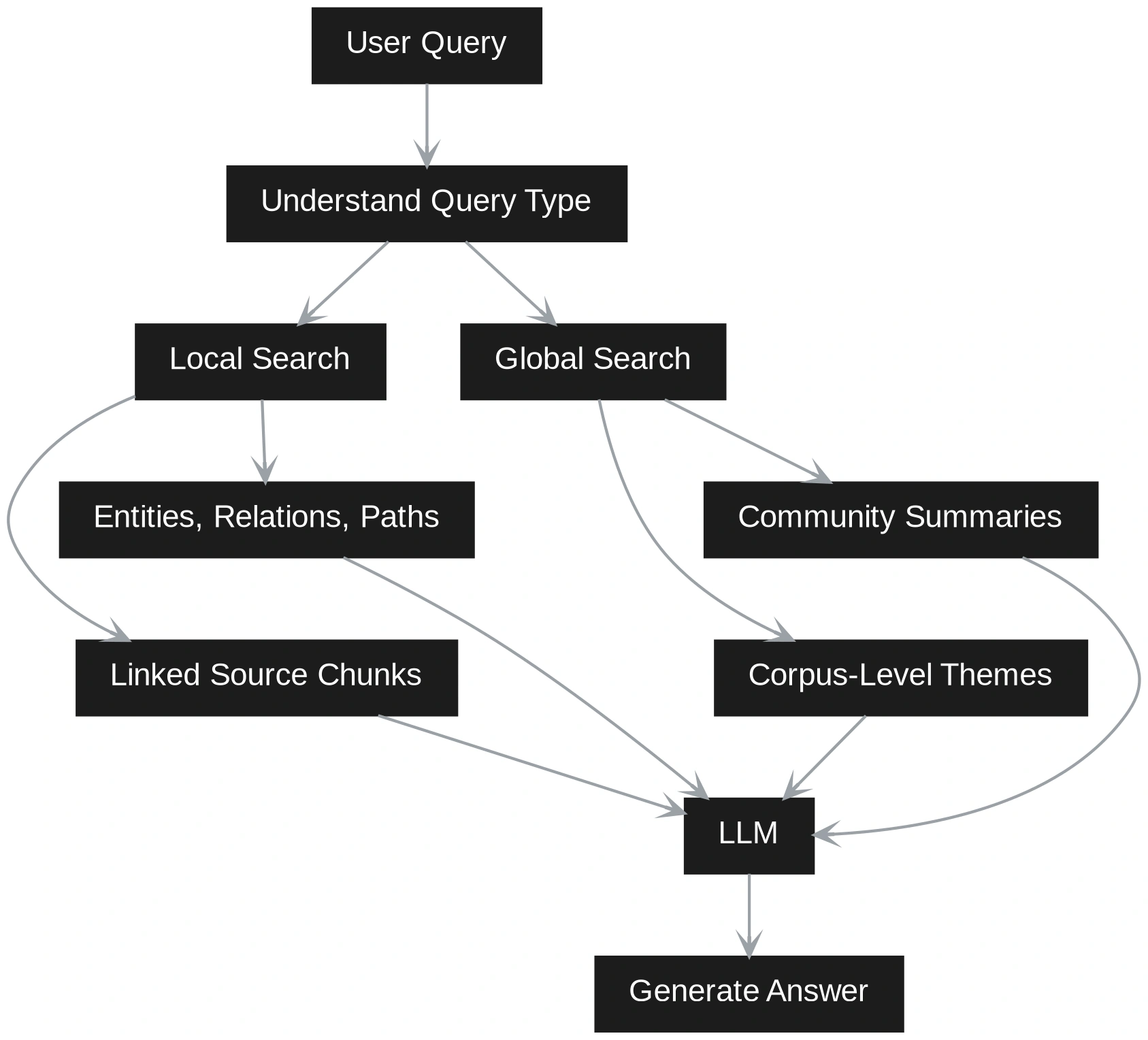
This implies Vector RAG retrieves by similarity, whereas GraphRAG retrieves by construction and which means collectively. Vector RAG is quicker and simpler when the query is slim. GraphRAG is stronger when the reply relies on connections throughout many paperwork. A hybrid system can use each paths. It may possibly first retrieve related chunks by way of vector search, then broaden the context utilizing graph relationships. This provides the LLM each textual proof and structured grounding.
Palms-on: Construct Vector RAG and GraphRAG from Begin to Finish
On this hands-on part, we are going to construct each Vector RAG and GraphRAG on the identical small corpus. The aim is easy. We need to present how Vector RAG retrieves related textual content chunks, whereas GraphRAG retrieves entities, relationships, and related context. We’ll use Python, SentenceTransformers for embeddings, FAISS for vector search, and NetworkX for graph storage and traversal. SentenceTransformers helps encoding textual content into embeddings, FAISS is constructed for environment friendly vector similarity search, and NetworkX shops graphs as nodes and edges with attributes.
First, set up the required libraries.
pip set up sentence-transformers faiss-cpu networkx pandas numpyNow create a small demo corpus. This corpus is deliberately small so the distinction is simple to point out.
docs = [
    {
        "id": "doc1",
        "text": "NourishCo is facing rising logistics costs in its North region. The operations team believes the issue is linked to poor demand forecasting.",
    },
    {
        "id": "doc2",
        "text": "The North region uses Vendor A for cold chain delivery. Vendor A has repeated delivery delays during high-demand weeks.",
    },
    {
        "id": "doc3",
        "text": "The analytics team proposed a machine learning forecasting model to reduce stockouts and improve supply planning.",
    },
    {
        "id": "doc4",
        "text": "The finance team is concerned that Vendor A delays are increasing working capital pressure because inventory buffers are rising.",
    },
    {
        "id": "doc5",
        "text": "The leadership team wants an AI roadmap that connects demand forecasting, logistics optimization, and vendor performance monitoring.",
    },
]
Now outline a easy chunking perform. On this demo, every doc is already brief, so we are going to deal with every doc as one chunk.
chunks = []

for doc in docs:
    chunks.append({
        "chunk_id": doc["id"],
        "textual content": doc["text"],
    })

print(chunks)
Now construct the Vector RAG index.
from sentence_transformers import SentenceTransformer
import faiss
import numpy as np

mannequin = SentenceTransformer("all-MiniLM-L6-v2")

texts = [chunk["text"] for chunk in chunks]
embeddings = mannequin.encode(texts, convert_to_numpy=True)

dimension = embeddings.form[1]
index = faiss.IndexFlatL2(dimension)
index.add(embeddings)

print("Vector index created with", index.ntotal, "chunks")
Now create a Vector RAG retrieval perform.
def vector_rag_search(question, top_k=3):
    query_embedding = mannequin.encode([query], convert_to_numpy=True)

    distances, indices = index.search(query_embedding, top_k)

    outcomes = []

    for idx in indices[0]:
        outcomes.append(chunks[idx])

    return outcomes


# Check the Vector RAG pipeline
question = "Why are logistics prices rising within the North area?"

vector_results = vector_rag_search(question)

for lead to vector_results:
    print(end result["chunk_id"], ":", end result["text"])
This retrieves chunks which can be semantically near the query. It ought to return paperwork about North area, logistics prices, Vendor A, and delays. That is helpful when the reply is current in a single or two related chunks.
Now allow us to construct the GraphRAG model. In a manufacturing system, entities and relationships are often extracted with an LLM or an info extraction mannequin. For this hands-on demo, we are going to manually outline them so the move is simple to grasp and clarify.
import networkx as nx

G = nx.Graph()

entities = [
    "NourishCo",
    "North Region",
    "Logistics Costs",
    "Demand Forecasting",
    "Vendor A",
    "Delivery Delays",
    "Analytics Team",
    "ML Forecasting Model",
    "Stockouts",
    "Supply Planning",
    "Finance Team",
    "Working Capital Pressure",
    "Inventory Buffers",
    "Leadership Team",
    "AI Roadmap",
    "Logistics Optimization",
    "Vendor Performance Monitoring",
]

G.add_nodes_from(entities)

relationships = [
    ("NourishCo", "North Region", "operates in"),
    ("North Region", "Logistics Costs", "has issue"),
    ("Logistics Costs", "Demand Forecasting", "linked to"),
    ("North Region", "Vendor A", "uses"),
    ("Vendor A", "Delivery Delays", "causes"),
    ("Delivery Delays", "Logistics Costs", "increases"),
    ("Analytics Team", "ML Forecasting Model", "proposed"),
    ("ML Forecasting Model", "Demand Forecasting", "improves"),
    ("ML Forecasting Model", "Stockouts", "reduces"),
    ("ML Forecasting Model", "Supply Planning", "improves"),
    ("Finance Team", "Working Capital Pressure", "concerned about"),
    ("Vendor A", "Working Capital Pressure", "contributes to"),
    ("Inventory Buffers", "Working Capital Pressure", "increase"),
    ("Delivery Delays", "Inventory Buffers", "increase"),
    ("Leadership Team", "AI Roadmap", "wants"),
    ("AI Roadmap", "Demand Forecasting", "includes"),
    ("AI Roadmap", "Logistics Optimization", "includes"),
    ("AI Roadmap", "Vendor Performance Monitoring", "includes"),
]

for supply, goal, relation in relationships:
    G.add_edge(supply, goal, relation=relation)

print(
    "Graph created with",
    G.number_of_nodes(),
    "nodes and",
    G.number_of_edges(),
    "edges",
)
Now create a perform to examine graph neighbors.
def get_graph_context(entity, depth=1):
    if entity not in G:
        return []

    context = []
    visited = set([entity])
    frontier = [entity]

    for _ in vary(depth):
        next_frontier = []

        for node in frontier:
            for neighbor in G.neighbors(node):
                edge_data = G.get_edge_data(node, neighbor)
                relation = edge_data["relation"]

                context.append({
                    "supply": node,
                    "relation": relation,
                    "goal": neighbor,
                })

                if neighbor not in visited:
                    visited.add(neighbor)
                    next_frontier.append(neighbor)

        frontier = next_frontier

    return context


# Check the graph retrieval
graph_results = get_graph_context("Vendor A", depth=2)

for merchandise in graph_results:
    print(merchandise["source"], "--", merchandise["relation"], "--", merchandise["target"])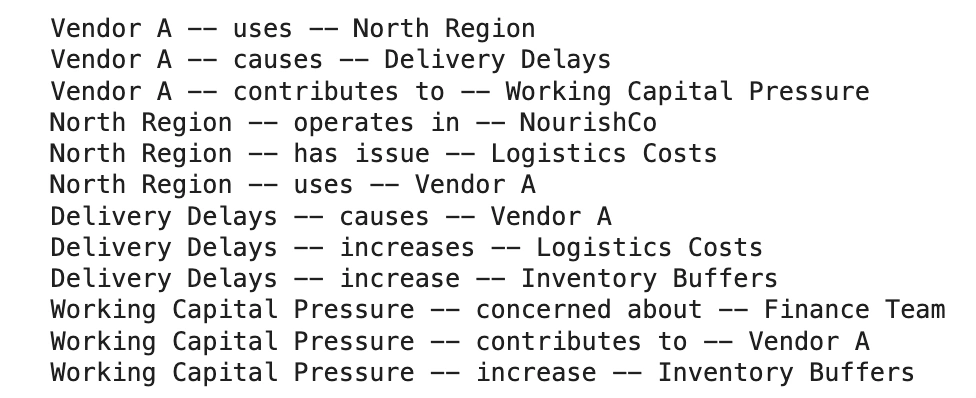
This provides related context. It doesn’t simply retrieve related chunks. It exhibits how Vendor A connects to supply delays, logistics prices, stock buffers, and dealing capital strain.
Now we create a easy GraphRAG question perform. For the demo, we are going to map question key phrases to entities.
def detect_entity(question):
    query_lower = question.decrease()

    entity_map = {
        "vendor": "Vendor A",
        "logistics": "Logistics Prices",
        "north": "North Area",
        "forecasting": "Demand Forecasting",
        "working capital": "Working Capital Stress",
        "monetary strain": "Working Capital Stress",
        "roadmap": "AI Roadmap",
    }

    for key phrase, entity in entity_map.objects():
        if key phrase in query_lower:
            return entity

    return None


def graph_rag_search(question, depth=2):
    entity = detect_entity(question)

    if not entity:
        return []

    return get_graph_context(entity, depth=depth)


# Check GraphRAG
question = "How is Vendor A related to monetary strain?"

graph_context = graph_rag_search(question)

for merchandise in graph_context:
    print(merchandise["source"], "--", merchandise["relation"], "--", merchandise["target"])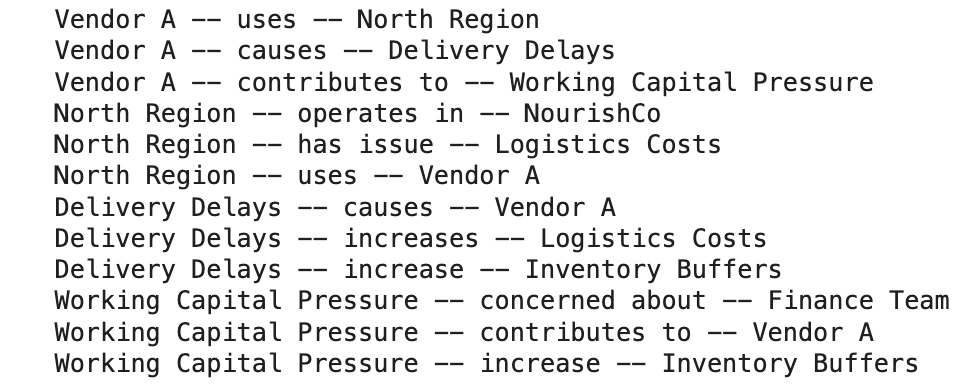
Now evaluate each strategies on the identical question.
question = "How is Vendor A related to monetary strain?"

print("VECTOR RAG RESULTS")

vector_results = vector_rag_search(question)

for lead to vector_results:
    print("-", end result["text"])
print("nGRAPHRAG RESULTS")

graph_context = graph_rag_search(question)

for merchandise in graph_context:
    print("-", merchandise["source"], merchandise["relation"], merchandise["target"])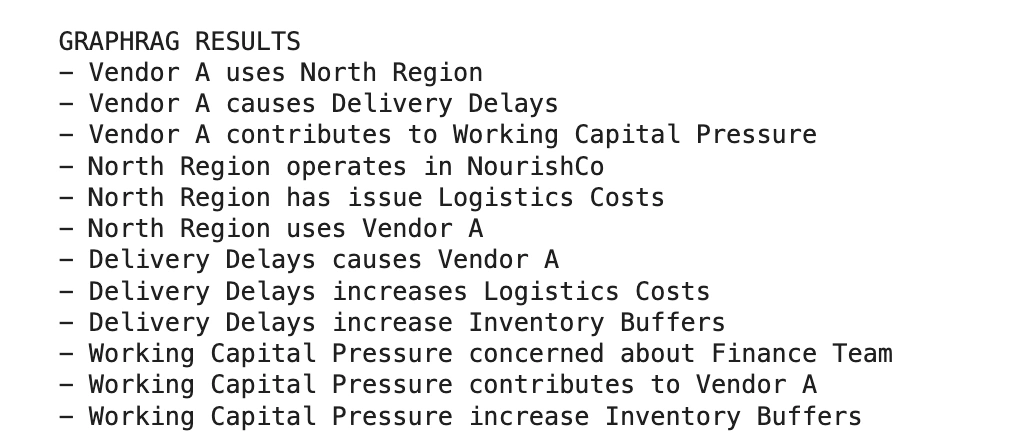
The Vector RAG output will return probably the most related textual content chunks. It could discover the finance doc and the Vendor A doc. GraphRAG will present the connection chain extra clearly. It may possibly present that Vendor A causes supply delays, supply delays enhance stock buffers, and stock buffers enhance working capital strain.
Now add a easy reply generator. This model doesn’t require an LLM API. It creates a readable reply from the retrieved context.
def generate_vector_answer(question, retrieved_chunks):
    context = " ".be a part of([chunk["text"] for chunk in retrieved_chunks])

    reply = f"""
Query: {question}

Vector RAG Reply:

Primarily based on the retrieved chunks, {context}
"""

    return reply


def generate_graph_answer(question, graph_context):
    information = []

    for merchandise in graph_context:
        information.append(
            f"{merchandise['source']} {merchandise['relation']} {merchandise['target']}"
        )

    joined_facts = ". ".be a part of(information)

    reply = f"""
Query: {question}

GraphRAG Reply:

Primarily based on the graph relationships, {joined_facts}.
"""

    return reply


# Run each reply mills
question = "How is Vendor A related to monetary strain?"

vector_context = vector_rag_search(question)
graph_context = graph_rag_search(question)

print(generate_vector_answer(question, vector_context))
print(generate_graph_answer(question, graph_context))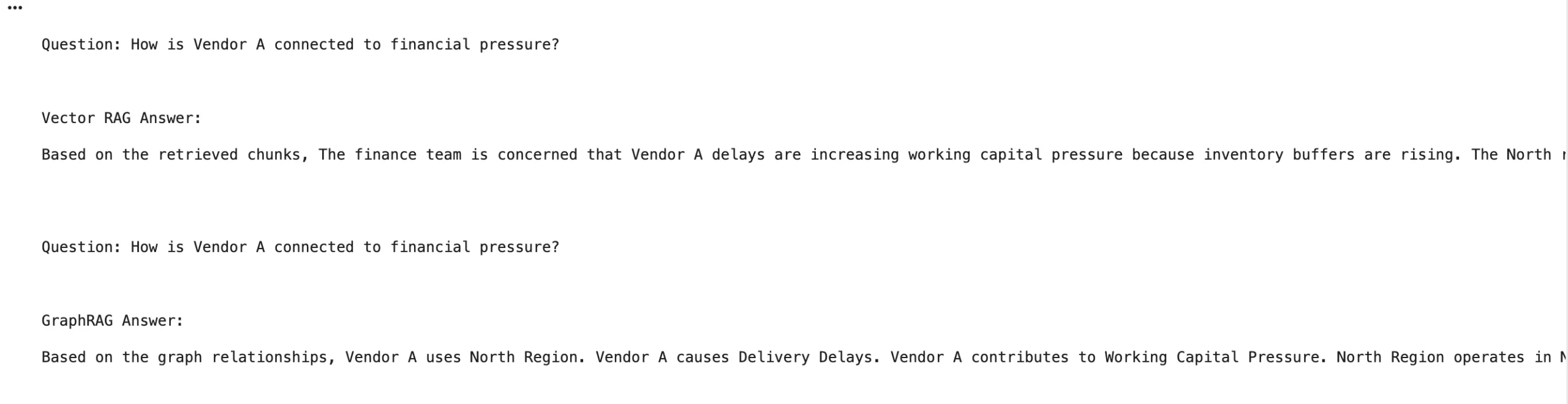
For a extra lifelike demo, you may join this retrieval output to an LLM. The LLM immediate may be saved easy.
def build_llm_prompt(question, vector_context, graph_context):
    vector_text = "n".be a part of([chunk["text"] for chunk in vector_context])

    graph_text = "n".be a part of([
        f"{item['source']} -- {merchandise['relation']} -- {merchandise['target']}"
        for merchandise in graph_context
    ])

    immediate = f"""
You're a enterprise analyst.

Reply the query utilizing solely the offered context.

Query:
{question}

Vector Context:
{vector_text}

Graph Context:
{graph_text}

Closing Reply:
"""

    return immediate


immediate = build_llm_prompt(question, vector_context, graph_context)

print(immediate)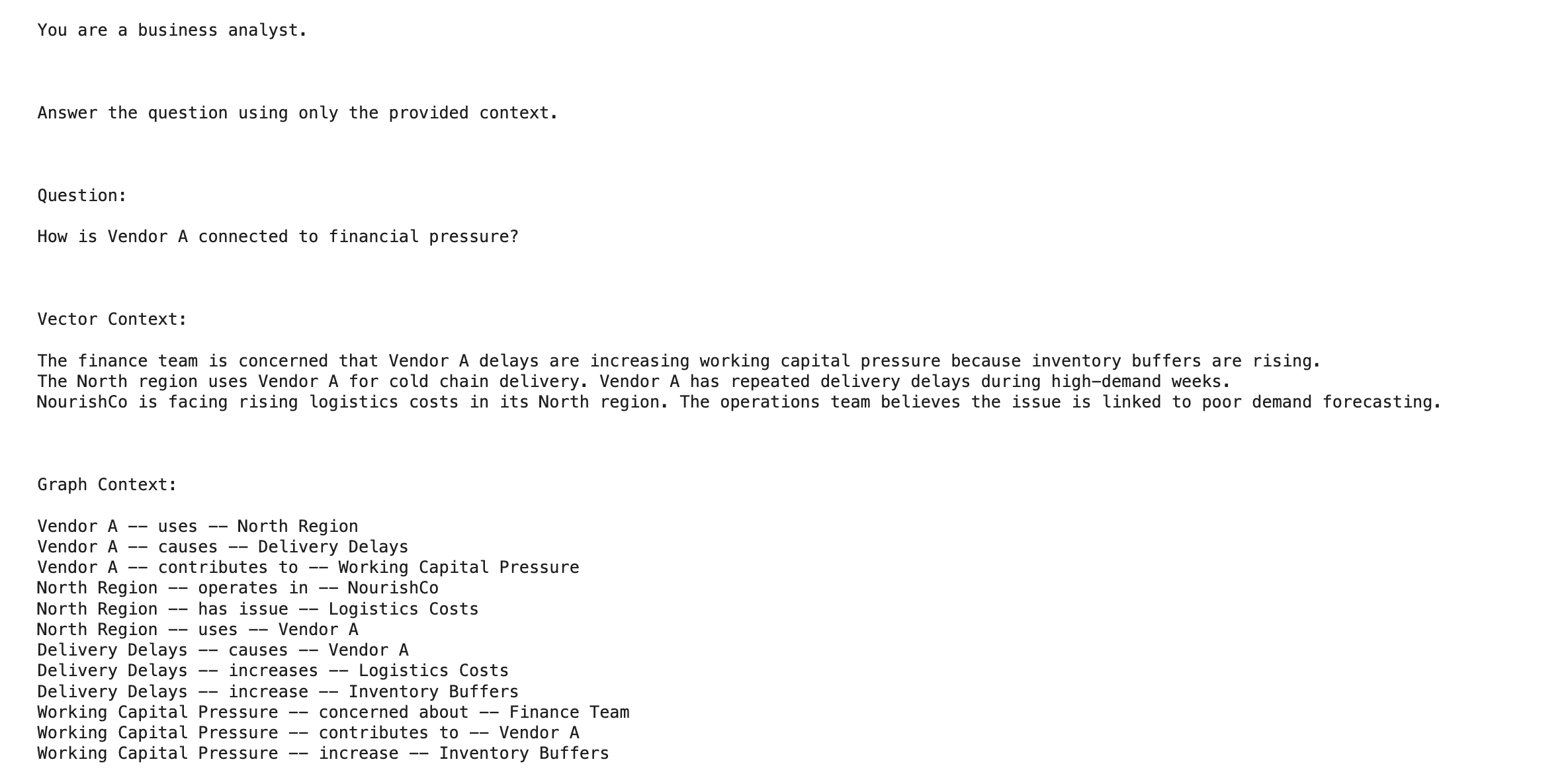
When to Use Vector RAG, GraphRAG, or Hybrid RAG
Use Vector RAG when the reply is probably going current in a single or a number of textual content chunks. It’s easy, quick, and works effectively for direct lookup questions.
Frequent use circumstances embody:
- FAQs
- Coverage paperwork
- Product manuals
- Assist articles
- Doc search
- Primary information assistants
A typical Vector RAG query seems like:
“What does the refund coverage say?”
Use GraphRAG when the reply relies on relationships throughout the corpus. It’s higher at connecting entities, occasions, dangers, groups, distributors, and enterprise processes.
Frequent use circumstances embody:
- Root-cause evaluation
- Compliance evaluate
- Investigations
- Danger evaluation
- Vendor evaluation
- Strategic synthesis
- Data discovery
A typical GraphRAG query seems like:
“How is Vendor A related to monetary strain within the North area?”
Use Hybrid RAG when the system wants each quick retrieval and deeper reasoning. Vector search can rapidly discover related textual content, whereas graph retrieval provides related context.
That is typically the perfect manufacturing setup as a result of actual customers ask blended questions. Some questions are easy lookups. Others want multi-hop reasoning. Some want each.
A easy routing rule:
Direct factual query → Vector RAG
Relationship-heavy query → GraphRAG
Combined or strategic query → Hybrid RAG
The sensible rule is easy: begin with Vector RAG. Add GraphRAG when similarity search misses necessary connections. Use Hybrid RAG when the appliance wants each velocity and construction.
Efficiency, Price, and Upkeep Commerce-offs
| Dimension | Vector RAG | GraphRAG |
| Indexing course of | Paperwork are chunked, embedded, and saved in a vector index. | Paperwork are processed to extract entities, relationships, claims, communities, and summaries. |
| Indexing price | Decrease price as a result of the pipeline is easy. | Larger price as a result of graph development and summarization add further steps. |
| Replace effort | Simpler to replace. New paperwork may be chunked and embedded incrementally. | Tougher to replace. New content material might require entity extraction, relationship updates, and graph refresh. |
| Retrieval velocity | Often sooner as a result of it makes use of similarity search. | Will be slower as a result of it might contain graph traversal, entity growth, and abstract retrieval. |
| Greatest use case | Direct factual questions and semantic lookup. | Relationship-heavy questions, multi-hop reasoning, and corpus-wide synthesis. |
| Explainability | Explains solutions primarily by way of retrieved chunks. | Explains solutions by way of chunks, entities, relationships, paths, and summaries. |
| Upkeep complexity | Simpler to keep up in fast-changing information bases. | Wants extra high quality checks as a result of improper entities or relationships can have an effect on solutions. |
| Sensible trade-off | Greatest when velocity, simplicity, and value matter most. | Greatest when construction, explainability, and deeper reasoning matter extra. |
Limitations and Failure Modes
It’s all good till issues come to a standstill. Right here’s the way it can occur:
- The place Vector RAG can fail
- Vector RAG can battle when the fitting reply isn’t contained in a single clear chunk.
- It could retrieve textual content that sounds semantically related however doesn’t totally reply the query.
- That is widespread when the question requires reasoning throughout a number of paperwork.
- Since Vector RAG doesn’t explicitly perceive entities, paths, or dependencies, it could possibly miss hidden relationships between ideas.
- The place GraphRAG can fail
- GraphRAG can fail when the underlying graph is weak or incomplete.
- If entity extraction is inaccurate, these errors get carried ahead into the graph.
- If necessary relationships are lacking, the system might produce an incomplete or deceptive reply.
- GraphRAG additionally requires extra preprocessing than Vector RAG.
- For easy lookup duties, the added price and complexity might not at all times be price it.
- The freshness problem
- Vector RAG is often simpler to replace when supply paperwork change.
- GraphRAG might require graph updates, refreshed summaries, and relationship validation.
- This makes upkeep extra complicated over time.
- Selecting the best method
- Consider each techniques on actual person questions.
- Begin with Vector RAG because the baseline.
- Add GraphRAG solely when the baseline fails on relationship-heavy or corpus-wide questions.
- Use Hybrid RAG when the identical software wants each direct lookup and deeper reasoning.
Conclusion
Vector RAG and GraphRAG are each helpful, however they remedy completely different issues. Vector RAG is the perfect first step. It’s quick, easy, and robust for direct questions. GraphRAG is beneficial when solutions depend upon entities, relationships, paths, and themes throughout many paperwork. It provides construction, nevertheless it additionally provides price and upkeep effort. In actual tasks, the perfect method is usually hybrid. Use Vector RAG for fast proof. Use GraphRAG for related reasoning. The aim is to not construct probably the most complicated system. The aim is to retrieve the fitting context and generate dependable solutions.
Continuously Requested Questions
A. Vector RAG depends on semantic similarity; it chunks textual content, converts it to embeddings, and retrieves paragraphs that sound most just like the person’s question. GraphRAG depends on construction; it extracts entities (like folks, locations, or corporations) and the relationships between them to construct a information graph, retrieving info primarily based on how ideas are explicitly related.
A. Vector RAG is the only option for direct, factual questions the place the reply is probably going contained inside a single paragraph or doc (e.g., “What’s the firm’s distant work coverage?”). It’s sooner to construct, cheaper to run, and far simpler to replace than GraphRAG.
A. GraphRAG excels at “multi-hop reasoning” and international questions that require connecting info throughout many alternative paperwork. For instance, answering “How did the availability chain delay in Asia affect Q3 income in Europe?” requires understanding the connection between the delay, the area, and the monetary end result, which a information graph handles a lot better than a easy vector search.

Hello, I’m Janvi, a passionate knowledge science fanatic at the moment working at Analytics Vidhya. My journey into the world of information started with a deep curiosity about how we will extract significant insights from complicated datasets.
Login to proceed studying and revel in expert-curated content material.

